
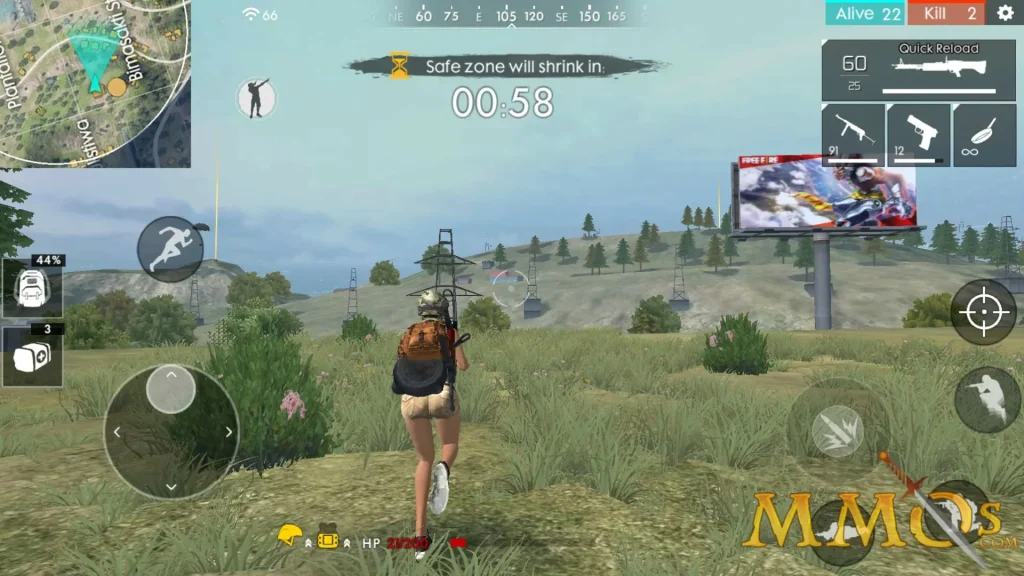
As a big player in FPS game market, Free Fire offers players an action-packed battle royale experience on PC and mobile devices. This gameplay walkthrough covers essential strategies for PC and mobile experience. By understanding the nuances of each platform, Free Fire players will be better equipped to dominate in various game modes and secure those coveted Booyahs!
This JollyMax guide helps all Free Fire players, either beginners or veterans, improve performance on playing this popular shooter game across PC and mobile platforms, by teaching gameplay basics, valuable tricks, and advanced tutorials. As an official partner of Free Fire series, JollyMax offers global players easy, fast & safe top-up of the game.
Getting Started with Free Fire: Platform Basics
Mobile Gameplay Fundamentals
Free Fire was originally designed as a mobile first-person shooter, optimized for touchscreen controls. When playing on a smartphone or tablet, you’ll navigate using a virtual joystick on the left side of the screen while aiming and shooting with the right. The game offers customizable HUD layouts, allowing you to position buttons according to your preference.
For optimal mobile gameplay:
- Enable “Auto-pickup” for faster looting
- Adjust sensitivity settings based on your device’s performance
- Use headphones for better directional audio cues
- Consider using finger sleeves for improved touch response
PC Gameplay Setup
Playing Free Fire on PC via emulators like BlueStacks offers enhanced controls and graphics. The keyboard and mouse setup provides greater precision when aiming in this shooter game. When configuring your PC gameplay experience:
- Map movement keys (WASD) and action buttons strategically
- Set mouse sensitivity based on your playstyle (lower for precision, higher for quick turns)
- Utilize function keys for quick weapon swapping
- Enable high frame rate options if your system supports them
For better gaming experience and advanced player features, top up Free Fire easily, instantly & safely at JollyMax official website.
Advanced Free Fire Game Mechanics
Weapon Mastery Across Platforms
One of the most critical aspects of Free Fire gameplay is understanding weapon dynamics, which varies slightly between PC and mobile platforms. In this FPS game, weapon recoil patterns tend to be more manageable on PC due to mouse precision, while mobile players must master thumb control techniques.
For optimal weapon performance:
- PC Users: Practice controlled mouse movements for recoil compensation, especially with high-damage assault rifles like M4A1 and SCAR
- Mobile Users: Master the “drag down” technique while firing to counter vertical recoil
- Regardless of platform, prioritize attachments that reduce recoil and improve accuracy
Character Selection Strategy
Free Fire’s character system offers unique abilities that can complement your gameplay style. When selecting characters:
- Alok’s “Drop the Beat” ability creates a 5m aura that increases movement speed and restores HP, beneficial for aggressive players on any platform
- K’s “Master of All” ability enhances EP recovery and is particularly useful for strategic PC gameplay where longer engagements are common
- Skyler’s “Riptide Rhythm” is effective for both platforms, as it destroys gloo walls and recovers HP
Mastering Different Game Modes
Free Fire offers various game modes beyond the standard battle royale. Each requires different approaches:
- Clash Squad: This fast-paced 4v4 mode benefits from PC precision in close-quarter combat
- Battle Royale: Mobile players often excel in positioning and stealth tactics due to touch controls facilitating quick movement adjustments
- Lone Wolf: This 1v1 mode tests pure gunplay skills, highlighting the differences between PC’s precision and mobile’s adaptability
To unlock advanced player features and improve gaming experience beyond Free Fire, top up more games or recharge more apps easy, fast & safely at www.JollyMax.com.
Platform-Specific Game Tricks
Mobile-Exclusive Gameplay Tips
Mobile players can leverage certain advantages unique to touchscreen controls in this action game:
- Use the “Gyroscope” function for more precise aiming during close-combat situations
- Master the “Claw” technique (using multiple fingers) for simultaneous movement, aiming, and firing
- Utilize the “One-Tap ADS” setting to quickly scope in during confrontations
- Configure your HUD for thumb accessibility, keeping critical functions within easy reach
PC Gameplay Advantages
PC emulator players can exploit these techniques for improved performance:
- Use “Peek & Fire” mechanics more effectively with precise mouse control
- Create custom macros for common action combinations (where allowed by game rules)
- Take advantage of wider field of view for better situational awareness
- Utilize higher resolution for spotting enemies at greater distances
Advanced Tactical Game Guide
Cross-Platform Gameplay Strategies
Many players switch between platforms depending on their situation. These universal tactics work across both PC and mobile gameplay:
- Master the art of “Gloo Wall” placement for instant cover regardless of platform
- Develop zone awareness to position yourself advantageously as the playable area shrinks
- Practice “Jump-Shooting” to make yourself a harder target while maintaining accuracy
- Learn map hotspots to predict enemy movements and plan ambushes
Optimizing Equipment Usage
Equipment management is crucial in this shooter game, regardless of your platform:
- Prioritize medkits and armor over grenades in early-game looting
- Coordinate utility items with teammates (smoke grenades for revives, flash grenades for pushes)
- Balance inventory space between ammunition types based on your weapon loadout
- Use vehicles strategically for rotation but be aware they attract attention
Bridging the Gap: Transitioning Between Platforms
Many Free Fire enthusiasts play on both PC and mobile, depending on their situation. Adapting your gameplay between platforms requires understanding the key differences:
- When switching from PC to mobile, expect a short adjustment period for touch controls
- Transitioning from mobile to PC may require recalibrating your spatial awareness due to the larger screen
- Practice sensitivity adjustments when switching platforms to maintain muscle memory
- Consider using similar button layouts across platforms to minimize adaptation time
Remember that Free Fire’s matchmaking system often separates emulator users from mobile-only lobbies, ensuring fair competition regardless of your chosen platform.
Conclusion: Becoming a Cross-Platform Free Fire Master
Whether you prefer the precision of PC gameplay or the convenience of mobile gameplay, mastering Free Fire requires dedication, practice, and strategic thinking. This first-person shooter game offers unique challenges and rewards across platforms, with each providing distinct advantages depending on your playstyle.
By implementing the game tricks and tutorials outlined in this guide, you’ll be well-equipped to improve your performance regardless of your chosen platform. Remember that consistent practice, tactical awareness, and adaptability are the keys to becoming a formidable Free Fire player in any game mode.
As you continue your journey in this thrilling action game, focus on developing your unique playstyle while remaining flexible enough to adapt to different scenarios. Whether you’re dropping into Bermuda or fighting in Clash Squad, the skills you develop will help you outmaneuver opponents and claim victory in one of the world’s most popular battle royale games.